
Management
CEO
Sales, cash, stock, and orders on one page, with a short list of what needs attention today.
InfiWits Dashboards for NetSuite
Ready-made dashboards that run inside your own NetSuite. Installed in a day, refreshed every 15 minutes, and checked against NetSuite's own reports.
The problem
Someone runs saved searches, exports them, and rebuilds the same spreadsheet every Monday. By the time it is shared, it is already out of date.
Sales says one figure, finance says another, and the meeting turns into a debate about whose report is right instead of what to do next.
A data warehouse, a BI license, a consultant, and a long project before the first chart appears. Then every change needs a developer.
InfiWits Dashboards skips all of that. The dashboards are already built, they run inside your NetSuite, and every figure is checked against NetSuite's own reports.
The dashboards
Every dashboard is included. Screenshots show demo data from "Demo Company Inc." Click any dashboard to see it full size.
Sales, cash, stock, and orders on one page, with a short list of what needs attention today.
Profit and loss against last year, gross margin, operating expenses, and net income by period.
Orders to ship, late orders, shipments, and days to ship, so you see delays before customers do.
Net sales over time, sales by channel, and your top customers and items, compared with last year.
Who owes you, how old it is, and who to chase first. Aging matches NetSuite to the cent.
What you owe by age, what is due in the next 14 and 30 days, and unapplied vendor credits.
A checklist of open items to clear before you close, each with the records and the dollars behind it.
Stock value, out-of-stock and low-stock items, slow movers, and suggested reorder quantities.
Open orders, backlog by age, and orders past their ship date, with shipments by month.
Open and late purchase orders, spend against last year, and ordered versus billed.
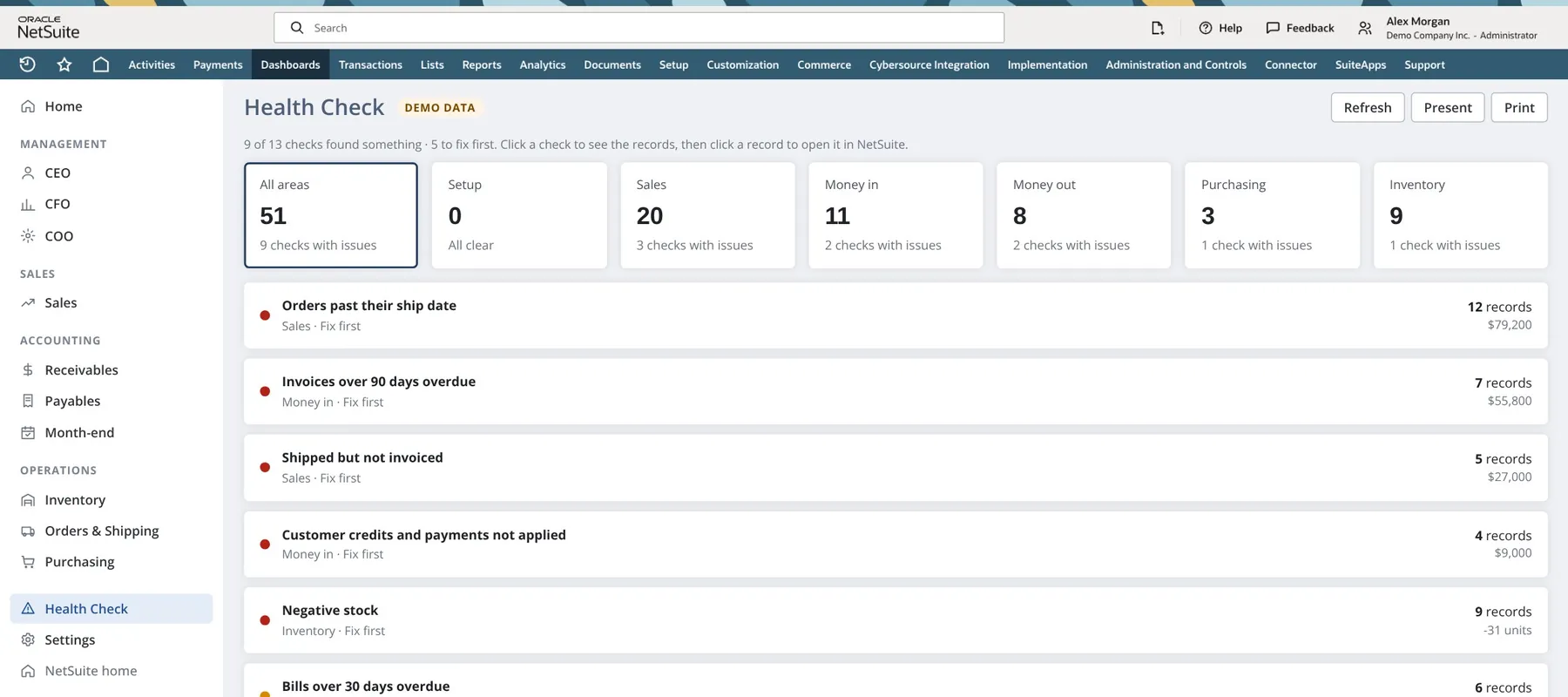
Finds problems in your NetSuite data and shows the money at stake, with the records to fix.
Health Check
Health Check scans your NetSuite for problems that quietly cost money or distort your reports. For each one it shows how many records are affected, the dollars at stake, why it matters, and how to fix it in NetSuite.
Figures above are demo data, not from any real company.
Why it's different
Every figure is checked against NetSuite's own reports. A/R aging and A/P aging match to the cent, so the dashboard and the ledger never tell two different stories.
Same login, same permissions, nothing exported. Set access per role and per person: sales reps see only their own customers, while finance sees everything.
When a data problem changes a number, the dashboard says so with a clear warning. You know when to trust a figure and when to look closer.
Foreign-currency sales and purchases are converted to your company's base currency, so totals add up the way your books do.
Works whether you sell through sales orders, invoices, or cash sales. Returns are counted correctly, and sales between your own companies are left out.
FAQ
About a day. We install the dashboards in your NetSuite account, match them to how your company sells (sales orders, invoices, or cash sales), and check the key figures against your NetSuite reports before you start using them. There is no data warehouse to build and no BI project.
Inside your own NetSuite account. The dashboards run in NetSuite, so nothing is exported or copied to another system. People sign in with their normal NetSuite login, and their existing NetSuite permissions apply.
You decide access per role and per person. For example, sales reps see only their own customers, while finance and management see the full picture.
It works with standard NetSuite accounts, including multi-subsidiary and multi-currency setups. Foreign-currency sales and purchases are converted to your company's base currency. On the demo we confirm it fits your account before you commit.
As many as you need. Every user gets every dashboard their role is allowed to see, and you can add people at any time. We agree the right number of users with you on the demo.
Book a 20-minute demo. We show you the dashboards, answer your questions, and confirm they fit your NetSuite account. If you go ahead, we install them and you are up and running in about a day.
The dashboards refresh every 15 minutes, and there is a Refresh button on every page when you want the latest figures right away.
In 20 minutes we walk you through the dashboards, answer your questions, and tell you plainly whether they fit your account.
Or email solutions@infiwits.com. We reply within one business day.